Interactive prototypes and user testing: Validating ideas before development

The cheapest time to find out that people will not use your product is before you build it. An interactive prototype and a few rounds of user testing let you learn that early, while a fix still costs design hours instead of engineering months. Skipping that step is expensive: in CB Insights' 2026 analysis of failed startups, poor product-market fit was named in 43% of cases, second only to running out of capital. Prototype testing is a direct way to check for that gap before the budget is committed.
This guide covers what interactive prototypes are good for, which usability testing methods fit each stage, how many users you actually need, and how our design team turns test findings into a validated build specification. It is written for founders and product managers deciding how much to invest in UI/UX design before development starts.
What an interactive prototype is for
An interactive prototype is a clickable model of your product that behaves like the real thing without any production code behind it. Unlike a static wireframe, it lets a person tap, scroll, and move through a full flow, so you can watch whether the product makes sense in use. A wireframe answers layout questions; a prototype answers behavioral ones.
Prototype fidelity, and why it matters for testing
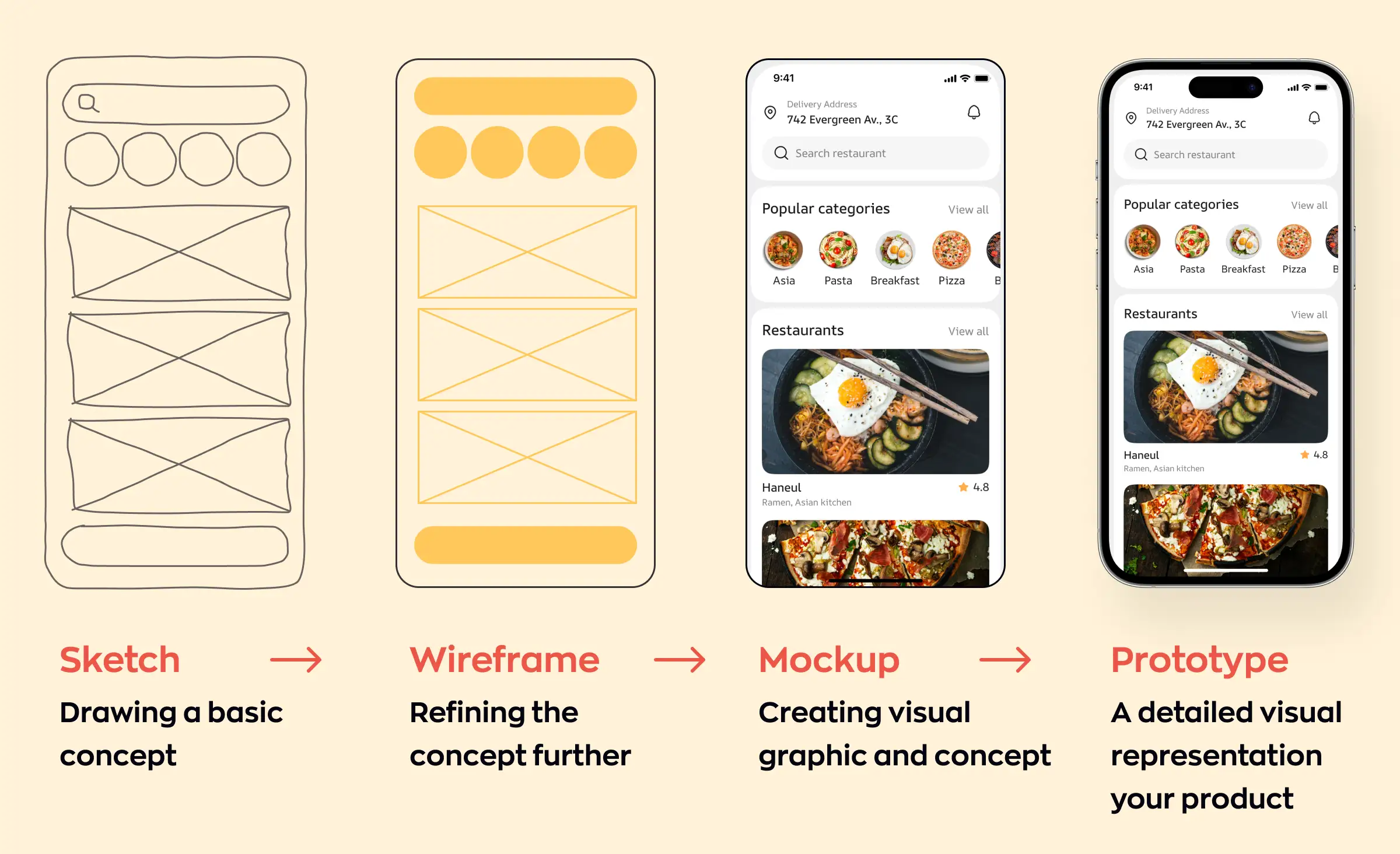
Prototypes come at different fidelities, and the fidelity you choose decides what a test can tell you. A low-fidelity prototype is fast and rough, built to check flows and information architecture (how screens and content are organized) while they are still cheap to change. A high-fidelity prototype looks and feels close to the finished product and is used to test visual design, micro-interactions, and detailed copy. Jumping to a polished prototype too early ties up design hours on screens that testing may cut.
Where prototyping sits in the design process
On most of our projects, prototyping follows concept design and a user flow chart, and precedes full visual design. The sequence matters: agree on structure with a wireframe, build an interactive prototype, test it, then invest in high-fidelity screens once the flow is proven. Skipping straight to finished design is how teams end up redrawing screens after the first round of feedback.
Usability testing methods, and when to use each
First, be clear on what you are testing. Concept testing asks whether people want the idea at all; usability testing asks whether they can actually use it; A/B testing asks which of two versions works better. This guide is mostly about usability testing, the stage where an interactive prototype earns its keep. The method you pick should match the prototype's fidelity and the decision you are trying to make.
Moderated testing
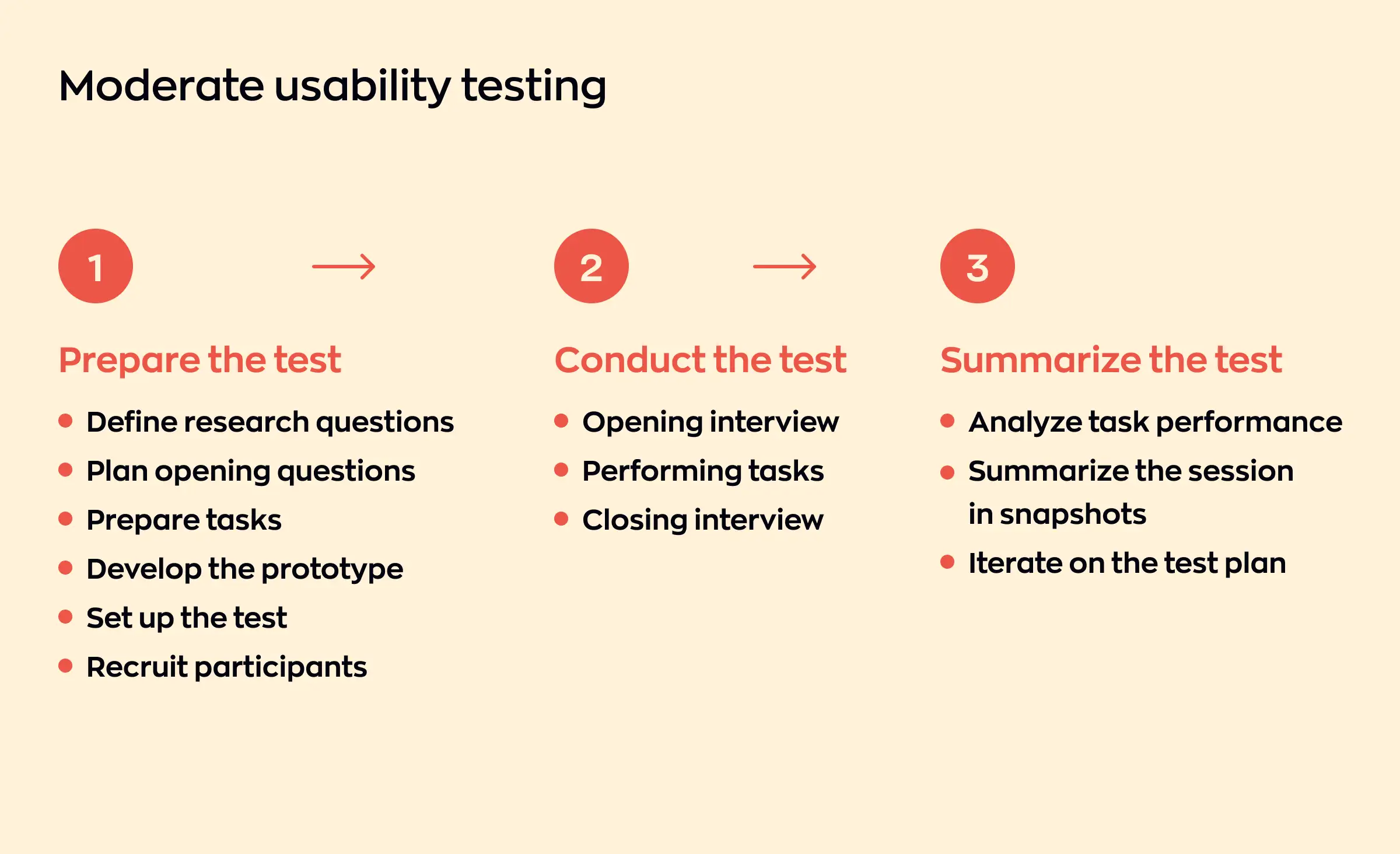
A facilitator gives the participant tasks and watches them work, asking follow-up questions when confusion appears. Moderated sessions suit early, low-fidelity prototypes that need a little explanation and complex flows where you want to understand the reasoning behind a stumble. The trade-off is scale: they are time-intensive, so you run them with a handful of users, not dozens.
Unmoderated remote testing
Participants complete tasks on their own devices, in their own environment, and testing software records what they do. This works best for high-fidelity prototypes that need little explanation and for scaled validation with 20 or more users, where you want numbers rather than narratives. The real-world context also surfaces device-specific issues that a supervised, in-office session can miss.
A/B testing
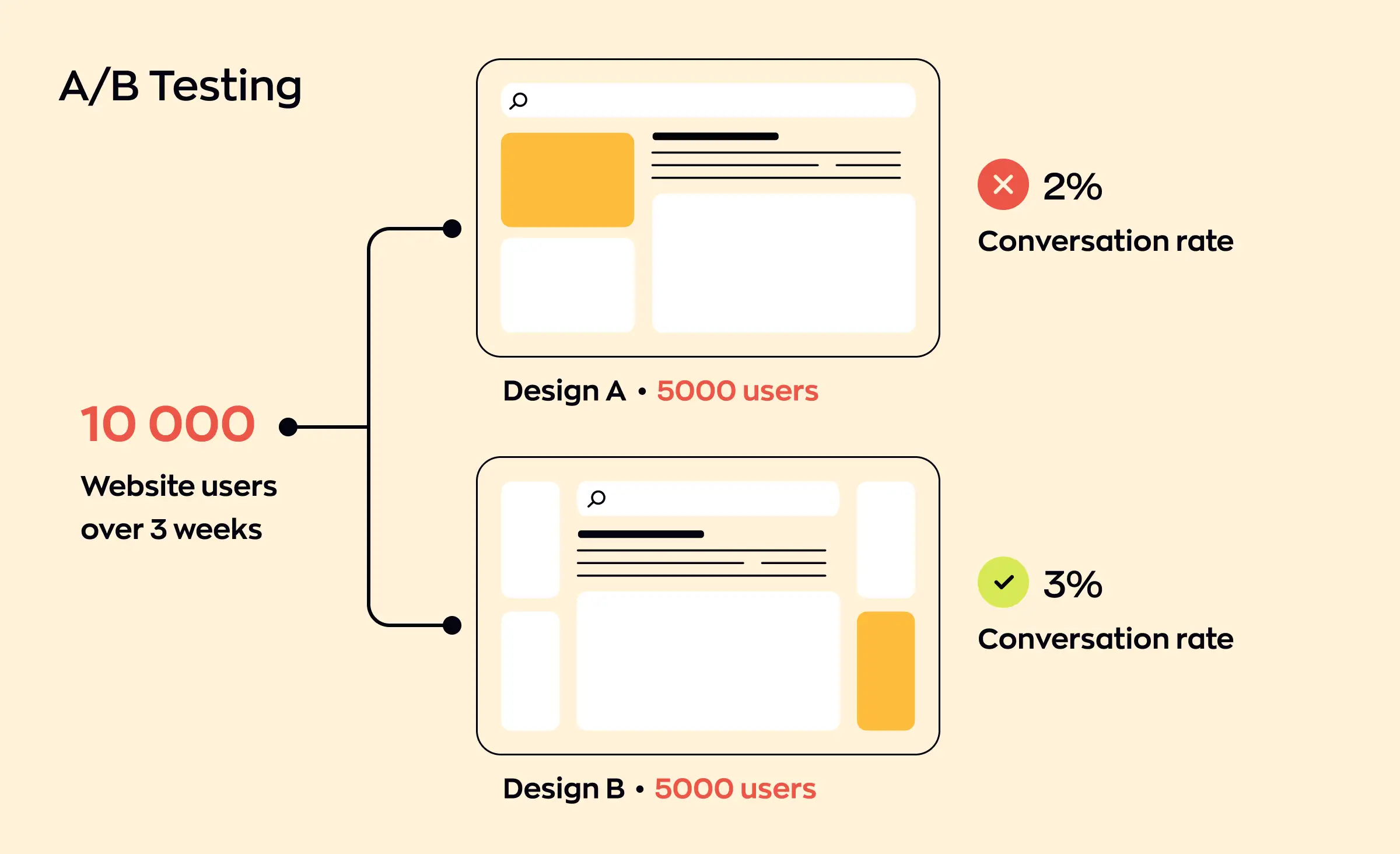
A/B testing shows two versions of a screen or flow to separate groups and compares a measurable outcome: task completion, conversion, or engagement. It gives hard evidence about which option performs better, which makes it valuable when validating a specific choice inside an MVP or before rolling a change out to a wider audience. It answers "which one," not "why."
Surveys, interviews, and session recordings
Surveys collect attitudes from many users at once; interviews go deep with a few; session recordings capture unfiltered behavior that people rarely mention out loud. None of these replace a task-based usability test, but they add context around it. A recording often shows the hesitation a user forgot to report, and an interview explains a pattern the numbers only hint at.
| Method | Best for | Prototype fidelity | Users per round |
|---|---|---|---|
| Moderated testing | Early, complex flows where you need to understand why users stumble | Low to mid | ~5 |
| Unmoderated remote | Scaled, quantitative validation where you want numbers, not narratives | High | 20 or more |
| A/B testing | Choosing between two concrete options once you have traffic | High or live | Enough per variant for significance |
| Surveys, interviews, recordings | Adding context around a task-based test, not replacing it | Any | Varies |
How many users you actually need
This is the question that stalls most teams. For qualitative usability testing, Nielsen Norman Group research from 2000 found that five users uncover about 85% of usability problems. That 85% is an average, not a guarantee: Laura Faulkner's 2003 study found that random groups of five caught anywhere from 55% to 99% of problems, while groups of ten never dropped below 80%. That variance is the real argument for running several small rounds, fixing issues between them, rather than betting everything on one group of five. When you need statistically reliable metrics such as task-success rates, the sample grows to 20 users or more, and unmoderated testing becomes the efficient way to reach it. If your product serves two distinct audiences, as Lainappi does with item owners and renters, test three or four people from each group rather than five overall, so one side's problems do not hide behind the other's.
Our prototype-to-validated-spec workflow
Testing only pays off if the findings change what gets built. On our projects, prototype testing is not a separate research exercise; it is the step that produces the specification the development team estimates and builds against.
Map the flows first
We start with a user flow chart that lays out every state and interaction agreed during concept design. This gives the designer a full picture of what the interface has to support before a single screen is drawn.
Prototype the risky parts
We build an interactive prototype focused on the flows most likely to confuse users or break the business model, not the whole product at once. The riskiest screens get tested first, because that is where a wrong assumption costs the most later.
Test with real users and record every change
Each round of usability testing produces a short list of what worked, what broke, and what we changed in response. A few habits keep the signal clean: no leading questions, no testing on colleagues, and real data rather than tidy placeholder content that hides empty and error states. We also prioritize findings by impact, not by how many people mentioned them, so a rare issue that blocks a task outranks a common cosmetic one.
Hand development a validated spec
The result is a build specification grounded in evidence: the flows that survived testing, the features we cut, and the reasons behind each, ordered by priority. Engineering estimates against proven screens rather than guesses, which is what keeps a first release lean.



What this looks like on a real project: Lainappi
Lainappi, a Finnish peer-to-peer rental service, came to us to launch quickly and test the idea on the market without overspending. The client arrived with a ready-made design prototype. Before building it as delivered, our designers ran an expert review of that prototype, and it surfaced the same kind of gaps a usability test usually catches. The prototype had no payment flow and no user profile, its verification path forced people through several sequential steps, and parts of the logic did not hold up.
We reworked the design around those findings rather than building the prototype as delivered. Account verification was collapsed into a single block on the profile screen. The whole rental process was moved into a chat that carries messages, system notifications, and the "Open box" action in one place, instead of scattering status across separate screens. The "I want to rent" request feature was cut after we judged it an unlikely scenario. Those are exactly the decisions a validated spec captures: what to add, what to simplify, and what to leave out.
“By the time a tested prototype reaches my team, the risky decisions are already settled, so we start building instead of re-opening them. On Lainappi the big changes, like folding the whole rental flow into a chat and dropping a feature we did not need, were made in design, where they cost hours. Catching them in production code would have cost weeks.”
Evgeny Leonov, CTO at Ronas IT
From validated prototype to a lean first build
A validated prototype is the natural input to a scoped first release. Once testing has confirmed which flows work, the same specification drives an MVP that ships only what has earned its place. If you are weighing where prototyping fits against a proof of concept or a full MVP, our breakdown of the difference between a PoC, a prototype, and an MVP sets out when each one makes sense.
Validation does not stop at launch, either. Testing a live MVP with real users is how you move from "people can use it" to product-market fit. The habit is the same one you started at the prototype stage: put the product in front of users, watch what happens, and let the evidence decide the next change.
What to do next
If you are about to commit a development budget, do this first. Sketch the two or three flows that carry the most risk, build a clickable prototype of just those, and run one moderated round with five users. Fix what breaks, run a second round, and write down every change you make. You will finish with a short, evidence-backed spec that tells your developers what to build and, just as usefully, what not to.
To see how this looks on shipped products, browse examples of our design work.
Frequently Asked Questions (FAQs)
What is the difference between a prototype and a wireframe?
Why test with 5 users instead of more?
When should I test with a low-fidelity vs. a high-fidelity prototype?
Moderated or unmoderated usability testing: which one should I use?
What mistakes make a usability test useless?
Does prototype testing really save money?
How long does a round of prototype testing take?
What comes after prototype testing?
Related posts





Related Services
MVP Development Services
Need to launch your startup quickly? Ronas IT offers urgent MVP development services, allowing you to get a fully-functional app in 4 to 12 weeks, depending on scope. Ideal for testing business ideas, presenting to investors, or entering the market swiftly. Benefit from our extensive experience and accelerated development process.
Custom Web App Development Services
Build secure, scalable web applications with Ronas IT’s custom web app development services. Our team covers the full cycle — from concept and UI/UX design to development, testing, and ongoing support — using leading tech like React and Laravel. With 200+ custom apps delivered across various industries, we ensure intuitive interfaces, smooth integration, and solutions tailored to your business goals.
App Development Services for Startups
Bring your app idea to life with Ronas IT’s app development services for startups. We specialize in building MVPs and custom mobile apps using React Native, helping you launch quickly, validate your concept, and reach investors or early users. From product strategy and design to development, app store release, and ongoing support, our team delivers scalable, cost-effective solutions tailored to your startup’s needs.