Custom LMS development: cost, break-even, and when to build

Custom LMS development pays for itself only when the license bill it replaces is bigger than the cost of running your own system. With us a custom LMS starts at $15,000 and takes at least 6 weeks. A build at that floor, against a $30,000 a year license bill and $14,400 a year of our running fees, pays back in just under a year before the cloud bill. Against a published plan at a few thousand dollars a year for the same employee training, it never pays back on price at all.
The arithmetic comes first: what an off-the-shelf platform actually charges for, what a build costs to make and to keep, how to compute your own break-even point, and three input mistakes that can turn the result around. If you want to write down what the system must do before you work out the cost, our LMS requirements checklist covers that step.
What people mean by custom LMS development
Three different things, and they carry different bills. Naming which one you are pricing removes half the confusion in a build-versus-buy conversation.
- Subscribe to a hosted platform. You rent a shared product. Setup is days, the vendor runs it, and you pay per user or per active user for as long as you use it.
- Extend an open-source platform. Usually Moodle. The license costs nothing, and you take on hosting, upgrades, and a plugin layer that has to survive every core release.
- Build your own. Your data model, your roles, your integrations, in a cloud account you own. This is what custom software development means here, and it is the only one of the three where the shape of the system follows the shape of your organization rather than the reverse.
Most organizations that end up building have already run route one or route two for a year or two. That is a good order to do it in, because a year of real usage produces a requirements list nobody can write from an empty page.
What actually drives the cost of an off-the-shelf LMS
The metering model decides it. Two vendors can print similar per-user numbers and send very different bills, because they count different people. Before you compare features, find out whether you are paying for everyone in the directory, everyone who logged in this month, or everyone who logged in this year.
| Platform | What is published | What the bill counts |
|---|---|---|
| TalentLMS | A rate for every plan and every user band. At the smallest band with yearly billing: Core $119 a month, Grow $229, Pro $449. Monthly billing and larger bands both cost more, and Enterprise is quoted | The user band you buy, and every band above the first costs more. Billing by the number of users who log in during the month is an opt-in extra, offered on the Pro plan only and up to 500 users, while the Pro bands themselves run to 1,000 |
| Docebo | No prices at all. Two named tiers, Elevate and Enterprise, and a note that it usually suits organizations training at least 250 learners | Product tier plus active users, with monthly, yearly or registered active user models to choose from |
| Moodle | Nothing to publish. The platform is distributed under the GNU General Public License and is free to download, modify and share | Nobody. The spend moves to hosting, upgrades and whoever maintains the plugins |
Two consequences follow. First, a quote for a platform that meters yearly active users will look worse than one that meters monthly active users at the same headline rate, and for seasonal training it usually is worse. Second, a free license is not a free platform, which is why the Moodle row still costs money every year even though the software costs nothing.
The tier you land on is often decided by integrations rather than by headcount, and the plan table shows exactly where. TalentLMS lists single sign-on on Core, its cheapest paid plan, but greys out LTI 1.3 support there and switches it on from Grow. A thirty-person team that only needs single sign-on stays at $119 a month; the same team pays $229 the day it wants to plug in a tool over LTI. Price the plan your integrations put you on, then add the band your user count puts you in.
What a custom build costs, and what it costs to keep
Our own numbers, so you have a real starting figure rather than a range invented for an article. A custom LMS for training your staff or partners starts from $15,000 and takes at least 6 weeks. A learning platform that schools or organizations sell to their own learners, with paid courses and education software features for students, is a larger product and starts from $20,000 and takes at least 8 weeks. Both prices include design, project management, testing, the backend and the integrations the platform needs, for a web or a mobile version; a mobile app next to the web LMS starts from half the first price. Around the build sit two more costs.
- Optional analysis phase, $1,000 to $2,000, at least 1 week. The written plan the build estimate is calculated from: who the roles are, what each one has to be able to do, which systems the platform has to reach, and what that adds up to in budget and calendar time. If one thing in the plan is genuinely uncertain, such as a video pipeline or a synchronization with a legacy HR database, this is where it gets answered.
- Running it afterwards, and this is the line people forget. Support with monitoring, fixes and updates starts from $1,000 a month for the LMS as one app, and DevOps and hosting add from $200 a month, so our running fees start from $1,200 a month, which is $14,400 a year. The cloud bill comes on top, and you pay it to the provider directly. Once mobile apps sit next to the web platform, support for the whole system starts from $2,000 a month, or $2,200 with DevOps and hosting, which is $26,400 a year. Pick the shape you would actually need before you run the calculation below, because it moves the answer as much as the build price does.
What pushes the build above the $15,000 floor is not screens. It is the number of roles the system has to separate, the number of systems it has to reach and how messy each connection is, whether existing course content has to be migrated rather than uploaded, and how many platforms learners use. Count those four before you treat the floor as your budget.
Roles, integrations and migration rules take a larger share of the price, because each one needs its own design and tests.
The break-even calculation
One line of arithmetic decides most of this, and you can do it before you talk to anybody.
Years to break even = build cost divided by (annual license bill minus annual running cost). If your running cost is equal to or higher than the license bill, there is no break-even point and the build has to justify itself on something other than price.
Take a build at the $15,000 floor and the smaller running shape, support from $1,000 a month plus DevOps and hosting from $200 a month, which is $14,400 a year. Set that against a $30,000 a year license bill. The difference is $15,600 a year, and $15,000 divided by $15,600 is 0.96 years, about eleven and a half months. The example leaves out the cloud bill: add yours to the running cost, and the payback moves later.
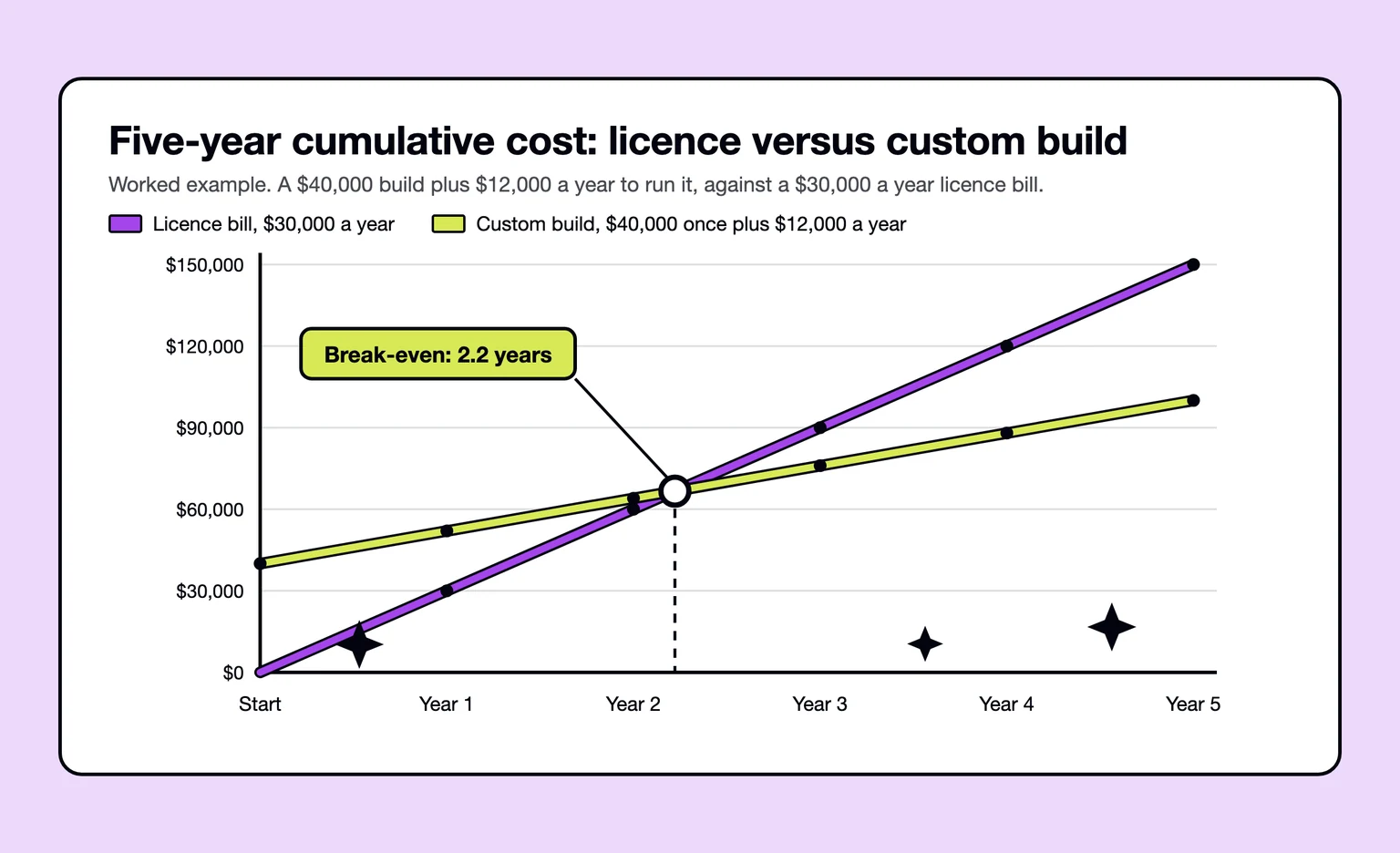
Change the license bill and keep the other two figures, and the picture moves fast. The table below is the same formula with the same $15,000 build and the same $14,400 a year of running fees, before the cloud bill.
| Annual license bill | Yearly saving after the build | Years to break even |
|---|---|---|
| $14,400 | $0 | Never on price |
| $18,000 | $3,600 | 4.2 |
| $24,000 | $9,600 | 1.6 |
| $30,000 | $15,600 | 1.0 |
| $48,000 | $33,600 | 0.4 |
Now run it against a published plan instead of an enterprise quote. TalentLMS Pro at its smallest user band with yearly billing is printed at $449 a month, which is $5,388 a year. Subtract $14,400 of running cost and the difference is negative, so the build never repays itself.
Then swap the running shape and watch the answer move. Add mobile apps for learners, and support for the whole system starts from $2,000 a month, and with DevOps and hosting the running cost becomes $26,400 a year. Against the same $30,000 license bill the saving drops to $3,600 a year, and the $15,000 build now takes about 4.2 years to repay, before you count what the extra apps cost to build. This is why we ask which platforms and which support you need before we quote anything: they move the result as far as the build price does.


Where the arithmetic usually goes wrong
Three mistakes can reverse the answer. All three sit in the inputs rather than in the formula.
You compared a sticker price with an active-user bill
A plan band and an active-user contract are not the same product. If you have 4,000 people in the directory and 600 of them log in during a given month, a monthly active user contract bills for 600 and a registered user contract bills for 4,000. Before you put a license figure into the formula, ask the vendor which of the two you are being quoted, and ask what happens in the month a compliance deadline pushes everybody into the system at once.
You treated integrations as a checkbox
Each connection is build work and maintenance work. An identity provider for single sign-on, an HR system that owns the org chart, a payment provider if you sell courses, a video service, a calendar. When we build the LMS, its integrations sit inside the build estimate, but every extra system adds scope to build and keep working and raises that estimate, and the same is true on the buy side: an off-the-shelf platform with five connectors you have to configure and keep working is not the zero-effort option the demo suggested.
You assumed your content and records come with you
This is the expensive one, because it does not show up until you try to leave. Course content packaged as SCORM moves between platforms. Learner activity moves too, but only if you were already writing it into a learning record store of your own with xAPI while the vendor platform was running. That specification is now an IEEE standard, published as 9274.1.1-2023 and built on the earlier xAPI 1.0.3 specification, which is a decent sign it is worth designing around. External tools plug in over Learning Tools Interoperability, and 1EdTech, the body that publishes it, names LTI 1.3 as the current version. What does not travel is everything the vendor holds in its own tables.
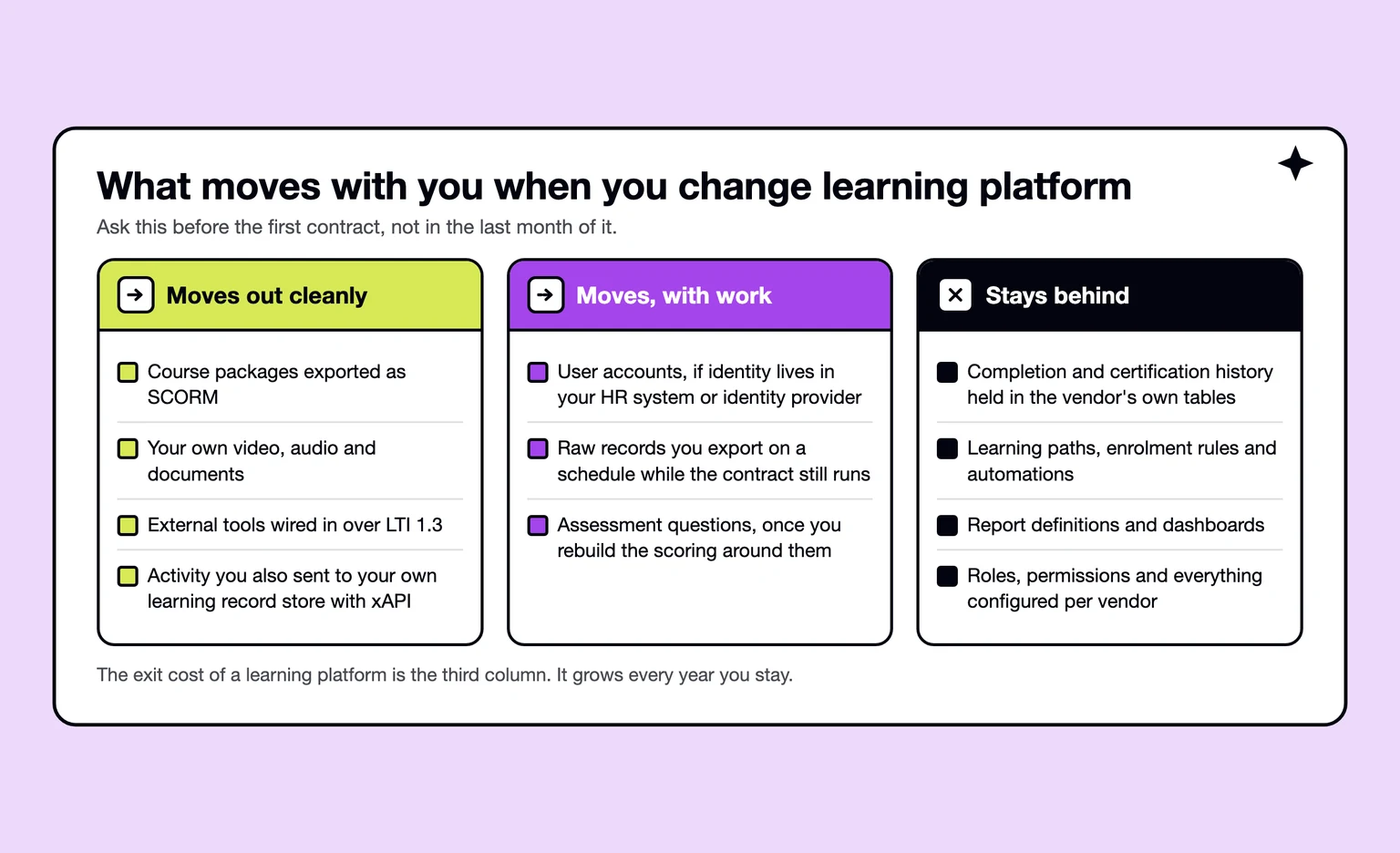
“Decide where the learner records will live before you decide which platform holds them. If every completion exists only in the vendor database, the price of leaving climbs every month whether you leave or not. Send the same events to a store you control from the first week, and you can swap the platform underneath later without losing the history.”
Alexander Storozhevsky, Lead developer at Ronas IT
When we tell people to buy off the shelf
Whenever the training itself is standard, which is more often than the people asking us expect. If your training is course delivery, quizzes, certificates and reporting for a few hundred people, that is a solved product sold at a price no build can match. The same goes for a team that has nobody to own a system afterwards: software without an owner degrades, and a vendor subscription at least buys you somebody whose job it is to keep it running.
We would also point you at Moodle before quoting a build, if what you need is standard course structures and you have or can hire the operations capacity. A free license plus hosting is a cheaper experiment than anything we can write, and it produces the requirements list you would otherwise pay us to guess at.
“If your whole training operation fits inside a plan that costs a few thousand dollars a year, we will say so, and we will say it before you pay us for an analysis phase. A build has to answer for itself on something the subscription cannot do. When the honest answer is that it cannot, the client keeps the money and we keep a relationship that is worth more than one project.”
Roman Surikov, CEO at Ronas IT
When building is the cheaper answer
In four situations, and only the first one is about price. The other three are about things a subscription cannot sell you at any tier.
- The license bill has outgrown the build. Run the formula with your own numbers; the table above shows how fast the payback shortens as the bill grows, and the case gets stronger every time the contract renews.
- Learning is part of the product you sell. If customers or partners log in to learn, the learning platform is a customer-facing product with your billing, your branding and your onboarding in it.
- The process does not fit the vendor data model. Multi-employer training records, regulated competency frameworks, assessment signed off by two named people, certificates that expire on a schedule set by a regulator. If you are already planning a spreadsheet to sit beside the platform, the platform does not fit the process.
- The integrations are the point. If the value is in what the learning data does after the course finishes, feeding a competency profile, a shift roster or an audit report, then the platform is a data source and you want to own its schema.
How we scope an LMS build before quoting
When the scope is not written yet, we recommend an analysis phase. It is optional, and the deliverable is a plan you own whether or not we build it. Our discovery phase for a tutoring platform is the closest published example, and it was analysis rather than delivery: the product had not been released, so the case shows placeholder branding and does not name the client. That engagement is published at $1,300 for two weeks of work. On a new LMS, the same optional step is priced at $1,000 to $2,000 and needs a week or more, and the work is the same shape on a corporate learning platform.
- Roles before screens. Three of them there, student, tutor and administrator, each with its needs written down and a journey map reviewed with the client. Changing a journey map costs an afternoon. Changing it during development costs a sprint.
- Features as user stories, then priorities. Every action each role can take, grouped into versions, so the first release carries the thing the product is actually for and nothing else.
- Business rules in writing. On that project the rules covered holding and charging money, refunds, cancellations, dispute resolution and participant safety. On a corporate platform the equivalent list is enrollment, mandatory training, expiry and who is allowed to see whose results.
- Integrations chosen, not built. We shortlisted Stripe Billing for payments and refunds, the Zoom SDK for lessons, the Google Calendar API for schedules and Intercom for support, so the team would spend its budget on the part nobody sells.
- A stack proposal with a reason. React on the front end, Laravel on the back end and Laravel Nova for the admin panel, chosen because we have component libraries for them and can move faster than a first build normally allows. For admin panels, our default today is Laravel Backpack, with Nova as the alternative.
An estimate made before design is an estimate about an assumption, so ours arrives with its assumptions written down, which is what lets you argue with it later.
AI features and learner data when the LMS is yours
On a subscription, the vendor decides which AI model reads your courses and carries much of the work of keeping learner data safe. On a custom LMS, both become your decisions and your line items. AI adds a usage bill that grows with the number of learners, and data protection adds duties that you would otherwise check in the vendor's contract.
What AI adds to the build and the running cost
- Building it: in a new LMS, AI features such as a course assistant or quiz drafts for authors are part of the build estimate. Adding one AI feature to an LMS you already run starts from $3,000 per feature, with the connection to the LMS API included.
- Running it: the model provider bills for every request, so put model usage into the break-even calculation as another running cost next to support, hosting and the cloud bill. Estimate it per active learner per month, and cap usage per learner so one heavy month does not surprise you.
- Switching providers: because the code is yours, you choose the provider and can move to another one. Keep the course text and the instructions for the model in your repository, and a switch becomes a configuration change followed by a test run on real learner questions. The exception is a search index built with one embedding model: it has to be rebuilt for the new one. We keep the model replaceable in the architecture from the start, so our support can include moving an AI feature to a newer model.
What you take on for learner data
With your own platform, your organization decides why and how learner data is processed, and every service the platform sends data to, such as hosting, email and the AI model provider, needs a data processing contract. If you sell the platform to US schools, FERPA lets them share student records with you only for the purpose they shared them for: 34 CFR 99.33 says the recipient may use the information “only for the purposes for which the disclosure was made.” A plan to train a model on those records therefore needs a lawyer's review first. The Department of Education's model terms of service guidance also calls it a best practice to require that records be returned or destroyed when a contract ends, so build an export and a deletion process for each customer from the first release.
The technical side is yours too: access checks on every request to the API, not only in the interface, encrypted storage and backups, an audit log of who viewed or exported learner records, and security updates as part of support. These are ordinary parts of our estimate, but they belong on your list so that a cheaper quote without them is easy to spot.
Who owns the system after launch
This decides your exit cost on the build side, exactly as the vendor schema decides it on the buy side. A project with us starts in the client's own cloud account, and the infrastructure, the cluster and the repositories are all stood up from code we reuse across projects. Because both the account and the code belong to the client, another team can pick the system up as it stands. Our Google Cloud fast start page spells the same arrangement out in full, down to the infrastructure code living in your repository.
I ask about this at the first call, before anyone talks about features. A learning platform outlives the team that builds it, and the question that decides whether it stays cheap to own is who holds the account and the code five years from now.
What we run afterwards is deliberately small: two environments, automated releases and monitoring, with security patching and a regular look at what the infrastructure costs. Response times are agreed in the support agreement. If your own team takes over, the handover takes two to four weeks and comes with deployment runbooks and knowledge transfer. If you need more than support, our DevOps services cover the infrastructure, and a dedicated development team keeps building features.
What to do next
Five steps, in the order we would take them.
- Write down your real annual license bill. Not the list price. The renewal quote, including implementation services, extra connectors and the seats you added mid-term.
- Find out what your vendor counts. Registered users, monthly active users or yearly active users. Then ask what a compliance month does to the invoice.
- Ask for a sample export. Course packages, learner records, completion history. What comes back tells you your exit cost more honestly than the contract does.
- List the integrations and count them. One line each. That list is the difference between a build near the $15,000 floor and a much larger one, on either side of the decision.
- Run the formula with your own three numbers. Build cost, license bill, running cost. If there is no break-even point, write down what the build would buy you that the subscription cannot, and decide on that instead.
Do those five and you will know the answer before anyone quotes you. If the arithmetic comes out close and you want a second opinion, send us the license figure, the user count and the list of systems the platform has to talk to, and we will come back with a scope and a number rather than a brochure.
Sources for the figures above: our own prices and the published TalentLMS plans, the Docebo pricing page, and the Moodle licensing statement. All four change, so check the primary source before you commit a budget to it.
Frequently Asked Questions (FAQs)
What is custom LMS development?
Building a learning platform for one organization instead of subscribing to a shared one. You own the code, the database and the cloud account, and you pay for the build rather than for seats. With us a custom LMS starts at $15,000, with design, project management and testing already in that price. Extending an open-source platform such as Moodle with your own modules is a third route between the two.
How much does it cost to build an LMS?
A custom LMS starts from $15,000 and takes at least 6 weeks, and that figure already covers design, project management, testing and the integrations the platform needs. An optional analysis phase at $1,000 to $2,000 can come before it. The number moves with how many roles the system has, how many systems it has to talk to, and whether existing course content has to be migrated.
Is a custom LMS cheaper than a subscription?
Only above a certain license bill. Divide the build cost by the difference between what you pay a vendor each year and what running your own system will cost. A build at our $15,000 floor, against a $30,000 a year license bill, support from $1,000 a month and DevOps and hosting from $200 a month, pays back in just under a year before the cloud bill, which you pay the provider directly. Against TalentLMS Pro at its smallest band, printed at $449 a month or $5,388 a year on yearly billing (TalentLMS pricing page), it never pays back on price alone.
How do you choose an LMS?
Start from the metering model, not the feature list, and we tell people to buy off the shelf more often than they expect. TalentLMS prices by the user band you buy, with billing by monthly logins as an opt-in extra on its Pro plan; Docebo quotes privately and offers monthly, yearly or registered active user models, and says it usually suits organizations training at least 250 learners (TalentLMS and Docebo pricing pages). The same headcount produces very different bills under those rules, so settle that before comparing features.
Can we move our courses and learner records to another platform later?
Courses usually move, records usually do not. Content packaged as SCORM exports and reimports, external tools plug in over LTI 1.3, and activity you also wrote to your own learning record store stays yours. Ask any vendor for a sample export of three things before signing: a course package, the learner account list and the completion history. Completion dates, learning paths and report definitions normally stay in the vendor schema.
Do we still need SCORM and xAPI if we build our own platform?
Yes, if you buy or reuse any course content. SCORM is what most authoring tools and course libraries ship, so whatever you build needs a player for it. xAPI is the newer one and has since become the IEEE 9274.1.1-2023 standard. Supporting both takes real work, so decide early rather than after the first library purchase.
What counts as an LMS integration, and what do integrations cost?
Every system the platform has to reach counts: single sign-on, the HR database, payments for paid courses, video hosting, calendars. When we build the LMS, its integrations are part of the build estimate rather than a separate charge per connection. A legacy HR synchronization or a video pipeline moves the figure once its scope is known.
How long does it take to build a custom LMS?
Our shortest timeline for a custom LMS is 6 weeks; a platform where you sell courses to students or other learners takes at least 8 weeks. What stretches it is integrations and content migration rather than screens. If the roles, features and integrations are not written down yet, our optional analysis phase, at least one week, produces the role map, the feature list and the integration shortlist the estimate is built on.
Can we start on Moodle and build our own platform later?
We often point people at Moodle before quoting a build. The software itself is free under the GPL, so the money goes to hosting, upgrades and whoever maintains the plugins. Run it for a year, keep your content in SCORM and your activity in your own record store, and you come to a custom build, or to the optional $1,000 to $2,000 analysis phase, with a requirements list instead of a guess.